 Simply Fluent

Prices and features below were checked in July 2026 and rechecked in September 2026. Apps change, so check the date on anything you read about software, this article included.
What this article is about
Most people learning a language have never tried to read a book in it. Ask them why and the answer is nearly always the same: it's too hard. Then they open one with the right help, read a few lines, and say "oh, I can read this."
That's what these apps are for. You want to read a book in the language you're learning, follow what's happening, and not put the book down every twenty seconds to type a word into a translator.
That is a narrow need. It isn't "learn Spanish" and it isn't "practise vocabulary". Duolingo won't do it and a textbook won't do it. What you want is a reading surface with a dictionary built into it.
Several apps do this, in quite different ways, and the differences matter more than the marketing suggests.
The short version
| App | What it is | Price (September 2026) | Best for |
|---|---|---|---|
| LingQ | A vocabulary system with a reader attached | $14.99/mo, $119.99/yr (US App Store) | Learners who want every word tracked, forever |
| Readlang | A browser extension that translates any web page | $6/mo, $48/yr | Reading the web, not just books |
| Beelinguapp | Side-by-side parallel text with recorded audio | $7.99/mo, $49.90/yr (US App Store) | Complete beginners who want both languages on screen |
| Kindle | An e-reader with a dictionary | Books only, no subscription | Cheapest path if you own one already |
| Eppika | Well-known books rewritten to your level | $49.99/yr (US App Store) | Famous recent titles at an easier level |
| Simply Fluent | A reading app where every word you save shows its translation above it in every book after | 30-day free trial, then €7.99/mo or €59.99/yr | Reading whole books without stopping every line |
Now what each one is like to use.
LingQ
LingQ is the serious one, and it's the one most likely to suit a particular kind of person better than my app does.
Its central idea is that vocabulary is the system, not a feature on the side. Every word you meet has a status, from new to known, and LingQ tracks that across everything you ever read in it. Words feed a spaced-repetition review queue, and your known-word count is the main measure of progress. Over months, the app builds a detailed model of what you do and don't know.
If that appeals to you, if you want the app to be an accountant of your vocabulary, LingQ does it more thoroughly than Simply Fluent, and you should use LingQ.
The costs are real. It's the most expensive option here at $14.99 a month on the US App Store (prices vary by region). The free plan is tight: 20 saved words and 5 imported lessons. And it's built around lessons with audio and a long list of importers (YouTube, Netflix, podcasts, articles), so there is a lot of app around the book. I compare the two in more detail on the LingQ comparison page.
Choose LingQ if: you want a complete vocabulary system and you'll use the review queue.
Readlang
Readlang's insight is that the book isn't the only thing you read.
It's mainly a browser extension. Install it and any web page in your target language becomes clickable: news, blogs, fan wikis, whatever you were already reading. Click a word, get a translation, save it. It also reads uploaded EPUB and text files, though not PDF, and it has no native phone app.
That's a much broader surface than a book app, and it's the reason to pick it. If most of your reading is on the web rather than in novels, Readlang is the better tool, and it isn't close.
At $6 a month it's also the cheapest paid option here. The free tier gives unlimited single-word translations and 10 phrase translations a day.
Choose Readlang if: you read articles and web pages more than books.
Beelinguapp
Beelinguapp does something nothing else here does: it puts the two languages side by side, with a recorded voice reading along, sentence by sentence.
For a complete beginner, that format can be gentler than selecting words. When you understand almost nothing, having your own language right there on the facing page is less tiring. At A1 and A2, parallel text with recorded audio is an easier way in than looking words up, mine included.
That's about format, not about who has beginner material. Simply Fluent has short stories written for A1 and A2 as well. The question is whether you'd rather see the whole translation next to the text, or the meaning of the word you selected.
The limits show up as you improve. It's a closed library: nothing in its FAQ or store listings describes importing your own book, so you read what Beelinguapp has, not the novel you wanted.
The US App Store lists $7.99 a month and $49.90 a year (September 2026), among a number of promotional prices. Check what you're charged when you sign up.
Choose Beelinguapp if: you're at the very beginning and parallel text sounds like a relief.
Kindle
A Kindle is very good reading hardware with the largest bookstore there is. If you own one, you already have a language-learning tool.
Kindle's Vocabulary Builder keeps one list across your entire library. Look a word up in one book and it's there when you're reading another.
A few things are worth knowing:
- Word Wise is not a translation feature. It shows simpler explanations above harder words, and it's available for books in English and Chinese only. For a book in another language, the dictionary lookup is the feature to use.
- Vocabulary Builder only exists on Kindle e-readers, not in the iOS or Android Kindle app. If you read on your phone, it isn't there.
- The flashcards were retired in late 2024. Your word list is still there to look through.
- There's no official way to export your word list.
I go through how to get the most out of one in is a Kindle good for learning a language?
Choose Kindle if: you already own one, you read on the device rather than your phone, and a dictionary lookup is all you need.
Eppika
Eppika takes well-known books and rewrites them to your level, from A1 to B2, in fourteen languages, with more than 120 titles according to its App Store listing. The book gets easier so you don't have to be better yet.
That solves a real problem: the gap between a graded reader and a novel is a cliff, and plenty of people fall off it. Simply Fluent answers the same gap in two different ways. Its short stories are written to a level from the start, from A1 to C2. Its modernized classics do the opposite: the whole book, as hard as the author wrote it, with only the old-fashioned language rewritten the way people write today. Nothing there is simplified; the difficulty removed is the century, not the story.
Eppika simplifies the prose itself. If what you want is a recent, famous book rather than Austen or Verne, Eppika does something Simply Fluent doesn't.
The trade-off is worth being clear about: you are not reading the book the author wrote, you're reading a version of it. Whether that matters depends on what you want from the experience.
Its App Store listing shows a Premium annual plan at $49.99 (September 2026). Reviewers there note you can only select single words, not phrases.
Simply Fluent
This is mine, so here is what it is, as plainly as I can put it.
I started building it in 2018, when I was learning Dutch and tried to read Harry Potter with Google Translate on my phone. I gave up after a couple of pages, mostly because I kept looking up the same words again a page later. Later I tried the reading apps that existed, and my complaint was never a missing feature. It was that none of them felt good to read in. There was always something between me and the page: a panel to manage, a popup to close, a counter going up.
That's a matter of taste, and you may disagree. But it's why the app exists: Simply Fluent is a reading app first, with the language learning inside it. You read books you'd choose to read, and the language comes with them. Everything else follows from that.
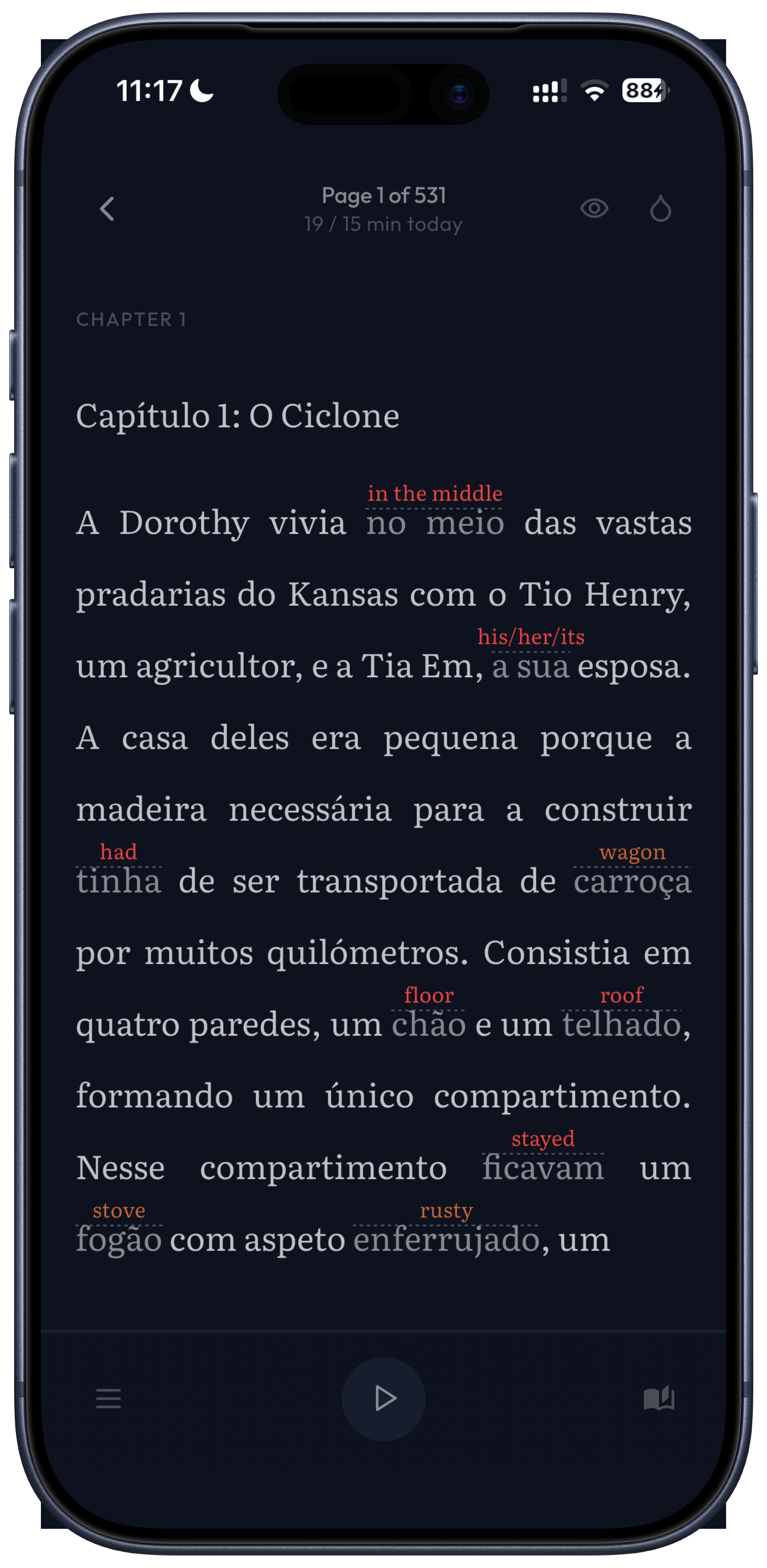
You never look the same word up twice. Save a word once and its translation is shown in small text above it, from then on, on every page of every book in that language. Your eye takes in the word and its meaning together, and you keep reading. Nothing to open, nothing to close.
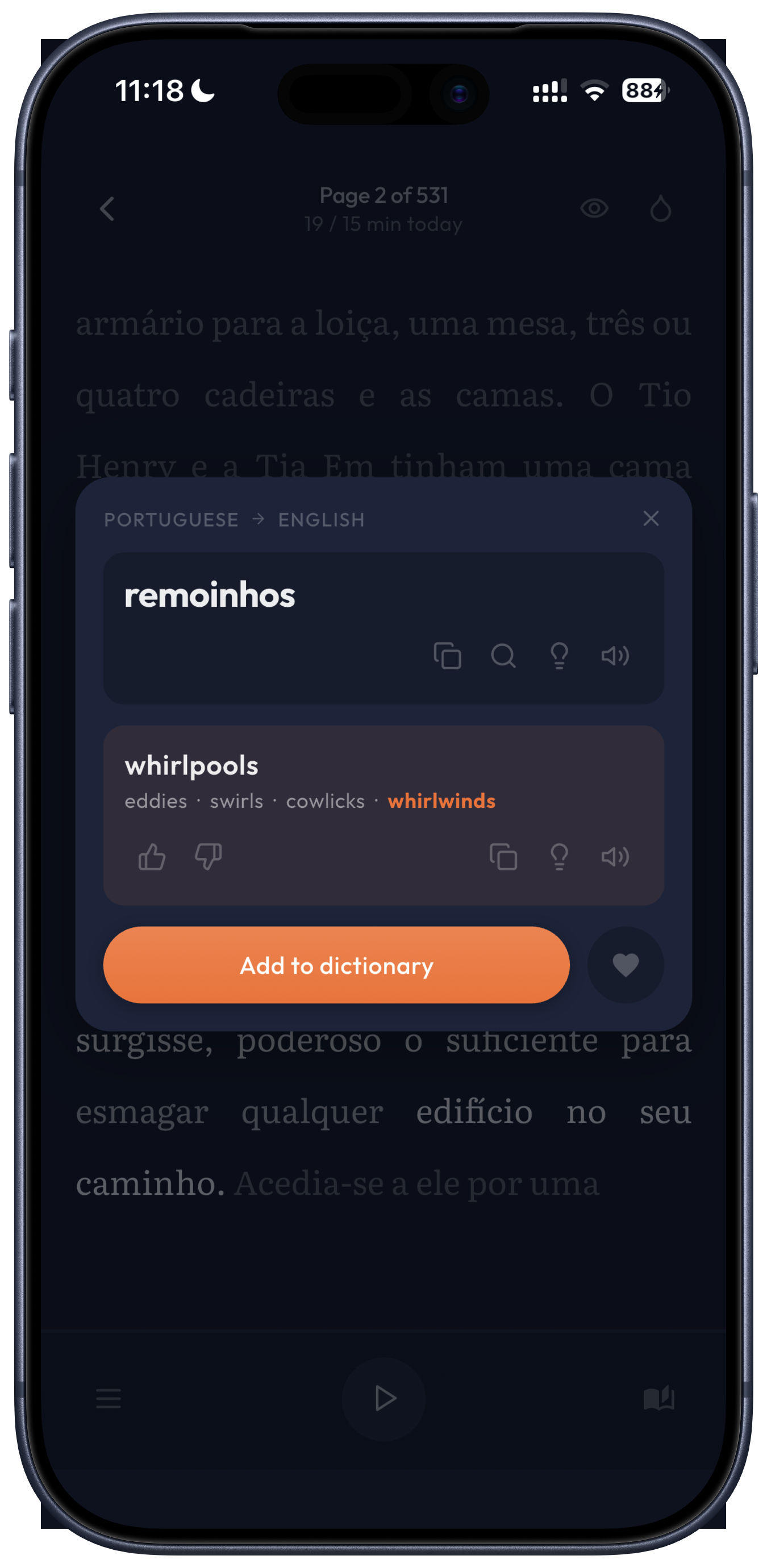
The translation fits the sentence. Most dictionaries give you every possible meaning and leave you to guess. Select a word here and the app reads the whole sentence and highlights the meaning that fits, with the other meanings beside it. Expressions and idioms are translated as one unit, so a phrase whose meaning isn't the sum of its words doesn't mislead you.
You decide when you know a word. Mark it memorized and its translation is hidden. The word stays highlighted, so if you forget it two hundred pages later you can open the translation again. Nothing decides for you that you've learned something.
Over a few books, the page goes from full of small translations to almost bare, because you keep hiding the words you've learned. Needing one translation every two pages is a very different place from needing four in every sentence, and you can watch yourself get there.
Your saved words become your dictionary and your flashcards, built from what you've read and weighted toward the words you meet most, so review comes from your own books rather than a deck someone else wrote.
It reads aloud. A single word, its translation, or the whole page, at three speeds, with the pages turning by themselves if you want to listen like an audiobook. It uses the voices on your phone, so it reads any book, including your own imports, and works offline. Most phones let you download high-quality voices for free in their settings.
There's something to read. Short stories you can filter by level from A1 to C2, and classic novels by writers like Jane Austen, Jules Verne and Arthur Conan Doyle, complete, with the old-fashioned language rewritten the way people write today. Not summarized, not abridged. Reading a 160-year-old French novel usually means fighting the century as well as the language; this gives you the book without that. You can import your own EPUB, PDF and text files too. There are books to read in 45 languages, and translation works into 131.
It runs on iPhone, iPad and Android. Everyone starts with a 30-day free trial; after that it's €7.99 a month or €59.99 a year, which is about half of LingQ.
Where Simply Fluent isn't the right answer: it has a dictionary and flashcards, but it doesn't track a status on every word you've ever seen the way LingQ does. If you read the web more than books, Readlang is the better tool. If you want recent bestsellers rewritten to your level, that's Eppika. And if you already own a Kindle and only need a dictionary, you may not need to buy anything.
So which one?
By where you are right now:
- You've never read anything in this language. Start with short graded stories, in Simply Fluent or anywhere else. If side-by-side text with a recorded voice sounds easier, Beelinguapp does that best.
- Novels feel too hard, and it's discouraging. Graded stories first, then a modernized classic in Simply Fluent, or a recent book rewritten to your level in Eppika.
- You want to read a whole novel without looking words up by hand. Simply Fluent, or a Kindle if you own one and read on it.
- You want your vocabulary tracked with rigour. LingQ.
- You mostly read articles, not books. Readlang.
- You don't want to spend anything. A Kindle if you own one, or Readlang's free tier.
The honest point underneath all of this: the app matters much less than whether you read. Every tool here works. The right one is the one that keeps you from closing the book. Forty pages a week in any of them beats four pages in the best one.
A few questions people ask
Is reading a good way to learn a language?
For vocabulary and a feel for grammar, it's one of the best things you can do: you meet words again and again, in context, which is how they stick. On its own it won't teach you to speak. Reading builds the raw material; speaking takes speaking.
Can I just use Google Translate?
You can, and it's miserable. That's how I started, and I gave up after two pages. Copying each word out breaks the reading. The point of these apps isn't translating better, it's translating without stopping.
What if the book is too hard?
Pick an easier book. It's the most common mistake and the easiest to fix. If you're looking up more than a word or two per sentence, you're decoding, not reading, and it won't stick. How to pick your first book goes into this, as does knowing when to level up.
Do I need to understand every word?
No, and trying to will make you quit. You don't have to understand everything.