 Simply Fluent


Everything below was checked in July 2026 and rechecked in September 2026. Kindle features change over time, so it is worth checking the date on any guide about them, this one included.
The short answer
Yes. A Kindle can be a very good way to read in a language you're learning, and if you already own one, it's the obvious place to start.
It's comfortable to read on for a long time, the store has books in dozens of languages, and you can look up a word without leaving the page. Most of what makes reading work for language learning is simply reading a lot, and a Kindle is built for exactly that.
Below is what the language features do, how to get the most from them, and what to add if you want more help than a dictionary gives.
What a Kindle does well
- It's a pleasure to read on. Weeks of battery, readable in sunlight, no notifications, light in the hand. That matters more than any feature, because the reading you do is what teaches you.
- The bookstore is enormous, with books in dozens of languages, so you can find something you want to read at your level.
- Dictionaries for about a dozen languages, and the Kindle can switch to the one that matches the book you're reading (The eBook Reader). Long-press a word and you get a definition without leaving the page.
- Vocabulary Builder. Every word you look up is saved with the sentence you found it in, in one list across your whole library. Look a word up in one book and it's still there when you're reading another. (Pocket-lint.)
- Nothing extra to pay if you already own one.
How to get the most out of it
Pick a book that's a little easy. This matters on any device. If you're looking something up in every sentence, you're decoding rather than reading. A book where you know most of the words lets you follow the story and pick up the rest from context. How to pick your first book goes into this.
Don't look up every word. Look up the ones that stop you following what's happening, and let the rest go. You'll meet the important ones again. You don't have to understand everything.
Go back through Vocabulary Builder now and then. Seeing each word again in the sentence you found it in is a good way to review, and it's all your own reading.
Read on the e-reader itself. Vocabulary Builder is a feature of Kindle e-readers; it isn't in the iOS or Android Kindle app (Pocket-lint). If you read on your phone some of the time, your lookups there won't be in the list.
Three things worth knowing
Word Wise is for English and Chinese books. Word Wise puts short explanations above harder words so you can keep reading without stopping. It's a good idea, but it's available for books in English and Chinese only (MakeUseOf), and it explains words rather than translating them. So for your Spanish novel, the dictionary lookup is the feature to use.
The flashcards were retired in 2024. Vocabulary Builder used to include flashcards. Amazon removed them in late 2024 (The eBook Reader). Your word list is still there to look through. Some older guides still describe the flashcards, so if you can't find them, that's why.
The word list stays on the device. There's no official export, so if you want to review your words somewhere else, you'll be copying them by hand.
Where a reading app for learners fits
I started building Simply Fluent in 2018. I was learning Dutch and tried to read Harry Potter, the paper book in one hand and Google Translate on my phone in the other. Every unknown word meant unlocking the phone, typing the word, spelling it right and finding my place on the page again. And more than once I found myself looking up a word, and then looking up the same word a page later. It made me feel like I couldn't learn anything. I gave up after a couple of pages.
A dictionary answers the question once. What I wanted was for the answer to stay on the page. So that's what Simply Fluent does, and it's a different job from what a Kindle is built for.
When you save a word, its translation stays above it in every book you read after that. You see the word and its meaning together, so you can keep reading without looking it up again.
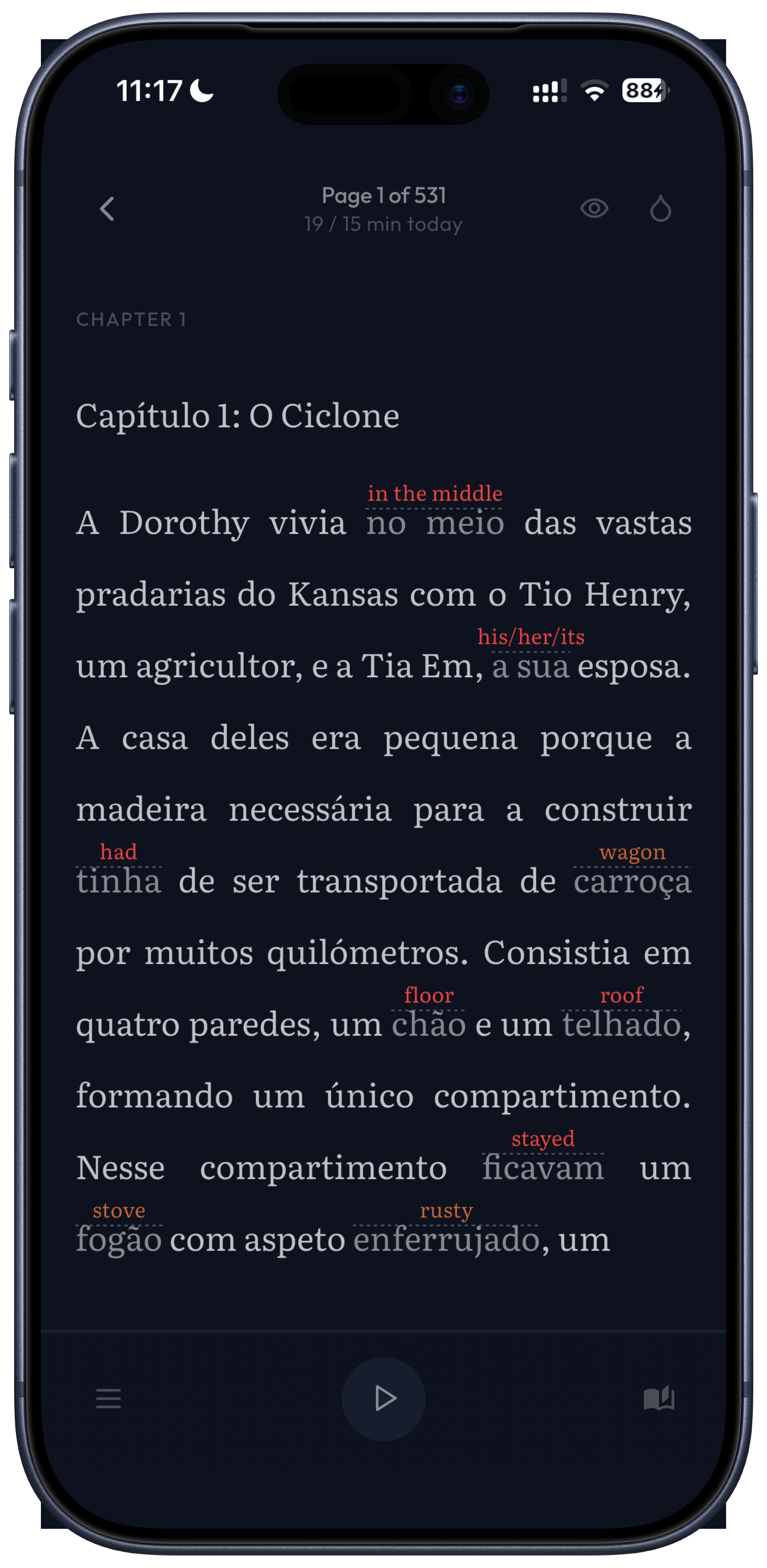
The translation fits the sentence. When you select a word, the app looks at the whole sentence and highlights the meaning that fits, with the other meanings next to it. If the word is part of an expression or an idiom, you get the whole expression translated, not word by word.
You decide when you know a word. When you mark a word as memorized, its translation is hidden, but the word stays highlighted so you can still open it if you forget. After a few books there are far fewer translations on the page, because you've hidden them as you learned the words.
All the words you save end up in your dictionary. When you practice them as flashcards, your favorite words and the ones you see most often in your books come up first, so you learn the words you need most before the rest. You don't have to practice for the reading to get easier, though, because the translations are already on the page.
You can start reading on the first day. There are short stories you can filter by level, from A1 to C2, and classic novels by writers like Jane Austen, Jules Verne and Arthur Conan Doyle, with the old-fashioned language updated to how people write today. You can also import your own EPUB, PDF and text files, and the app can read any page aloud with your phone's voices, even offline.
It's on iPhone, iPad and Android, and translates into 131 languages. You get a 30-day free trial, and after that it's €7.99 a month or €59.99 a year.
Which to use when
The two do different things well, and you can use both.
- A Kindle is the better device for long, comfortable reading sessions, for a huge choice of books, and for anyone who already owns one and is happy looking words up in the dictionary.
- Simply Fluent is for when you want the translations to stay on the page, want the meaning chosen for the sentence, or do your reading on your phone.
Whichever you use, the thing that makes the difference is the same: pick a book you want to finish, and keep reading. Every page you read makes the next one a little easier.
Related reading
- The best apps for reading books in another language, the full comparison
- How many words do you need to read a novel?
- The compound effect: why every page makes the next one easier
Common questions
- Is a Kindle good for learning a language?
Yes, especially for reading. It is comfortable to read on for hours, the store has books in dozens of languages, you can look up a word without leaving the page, and Vocabulary Builder keeps every word you look up, with its sentence, across all your books. Vocabulary Builder is on the e-readers, not in the phone app.
- Can I use a Kindle Scribe to learn a language?
Yes. The Scribe is a Kindle e-reader, so it has the same dictionary lookups and Vocabulary Builder as the other models. The larger screen is pleasant for reading, but it does not add language features the other Kindles lack.
- Does Kindle Word Wise work in Spanish or French?
No. Word Wise is available for books in English and Chinese. It shows simpler explanations above harder words and does not translate, so for a Spanish or French book the dictionary lookup is the feature to use.